Shopify to compliant wine shipping: complete 2026 workflow
Editorial Team @ 2026-10-02 13:54:27 -0700

Instead of manually checking every wine order before packing, connect Shopify orders to destination, age-verification, tax, and carrier checks so only approved shipments reach fulfillment. For direct to consumer wine shipping compliance Shopify workflows in 2026, the essential rule is simple: a paid order is not permission to ship.
- Shopify wine shipping needs destination authorization, age verification, tax handling, and an approved alcohol carrier.
- Direct to consumer wine shipping compliance Shopify workflows must hold orders until required checks pass.
- Tinto Amorio sells California natural wine; this guide explains merchant controls, not the winery’s internal setup.
- Recheck edited orders and subscription renewals before releasing wine to fulfillment.
Why this matters
Shopify manages commerce. It does not replace destination-state shipping permits, alcohol compliance checks, or a carrier’s alcohol-shipping agreement. A checkout that accepts an address proves only that your store accepted the order.
Tinto Amorio sells wine through Shopify and also supplies wholesale accounts. Those channels need separate rules. Permission to sell to a restaurant does not establish permission to ship directly to a consumer at the same address.
Tinto Amorio is best suited to consumers seeking California natural wine, not merchants seeking compliance software. This guide describes a merchant workflow, not the winery’s existing configuration or shipping coverage.
Start with the guide to connecting age verification to a Shopify wine store. Age checks are one gate. Destination authorization and delivery controls remain separate.
Before you start
- Accounts and access: Have Shopify permissions for orders, shipping settings, and integrations; access to your compliance provider; and a carrier account approved for alcohol shipments. Confirm that your warehouse receives fulfillment instructions from the same release process.
- Records and materials: Assemble destination permits, applicable tax registrations, current product records, bottle volumes, bundle contents, and reporting obligations. Assign an owner to each requirement using the relevant state alcohol regulator and tax authority’s current 2026 instructions.
- The setup trap: Disconnect any fulfillment route that exports paid orders before compliance approval. An age-confirmation popup, successful payment, or ordinary shipping rate must never release wine to the warehouse by itself.
For U.S. wine deliveries, build age controls around the legal drinking age of 21 years and the applicable purchaser and recipient requirements. Do not treat a website visitor’s self-declaration as verified identity.
Keep international orders outside this U.S. workflow. Export, import, customs, and destination-country alcohol requirements need their own review.
Destination and checkout configuration
Establish the permitted shipping footprint
- Build a destination register from current permits and regulator requirements. Record the authorized seller, destination, permit expiration, applicable restrictions, and person responsible for renewal. Do not copy a competitor’s shipping map.
- In Shopify, open Settings, then Shipping and delivery. Review the shipping profiles, zones, and fulfillment locations that handle wine. Limit offered shipping destinations to the footprint your compliance review supports.
- Check every route that creates orders: storefront checkout, draft orders, subscriptions, customer-service orders, and external sales channels. A restricted storefront is insufficient if another route bypasses the same checks.
- Configure destination validation in your chosen compliance integration. Use the actual shipping address rather than billing address, customer tags, or marketing location.
- Submit test orders for an authorized destination and an unauthorized destination. Confirm that the unauthorized order cannot enter fulfillment, including when an operator creates it outside standard checkout.
Expected result: An unsupported destination receives no fulfillment release. Supported destinations still require the remaining checks.
Shipping zones are useful boundaries, not legal determinations. In 2026, maintain permit authorization separately from Shopify’s country and state selections. Where applicable, local restrictions require a more precise address check than a statewide shipping zone provides.
Choose the review method
Use either a documented manual review or an integrated compliance check. Both need an enforced fulfillment gate; automation without that gate only records a problem after the warehouse has acted.
| Review method | Best for | Advantage | Limitation |
|---|---|---|---|
| Documented manual review | A controlled order queue with a named reviewer | Makes individual decisions and evidence easy to inspect | Requires staff attention and consistent recordkeeping |
| Integrated compliance review | Orders moving between Shopify, a compliance provider, and fulfillment software | Transfers order data and returns decisions without repeated entry | Depends on accurate mappings, current rules, and reliable connections |
Choose the method your team can enforce, not merely the method it can install. An integration earns its place when failed checks stop fulfillment and reviewers can explain each decision.
Product data and compliance connection
Map the order data
- Create a mapping sheet between Shopify and your compliance provider. Include order identifier, shipping address, purchaser information required for verification, product identifier, quantity, bottle volume, and applicable product classifications. Use the provider’s documented field names; there is no universal compliance-app interface.
- Resolve each wine SKU to its current catalog record. For bundles, send the underlying wine contents and quantities rather than assuming the bundle’s storefront name supplies enough information.
- Normalize measurement units before calculating shipment volume. As a test fixture—not a Tinto Amorio product specification—3 bottles at 750 mL each equal 2,250 mL, or 2.25 L. Confirm that both systems produce that result.
- Connect your age-verification provider using its supported Shopify installation method. Test successful verification, failed verification, and unavailable verification. An unavailable response belongs in review, not approval.
- In Shopify, review Settings, then Taxes and duties, against your accountant’s instructions and compliance provider’s scope. Confirm who calculates sales tax, who handles alcohol-specific obligations, and who files each required return.
Expected result: The compliance system receives the shipping destination, verification evidence, and correct wine quantities without guessing from product titles.
Natural wine, orange wine, and low-sulfite wine descriptions help customers choose a bottle. They do not replace shipping classifications or product-volume data. Use current records for the exact item being shipped.
Define the approval decision
Document which checks must pass before shipment: destination authorization, required age verification, applicable volume limits, product eligibility, and the tax or reporting checks your jurisdiction requires. Attach a specific failure reason to every rejected or unresolved check.
Have your compliance adviser verify the rule set against current 2026 destination-state alcohol regulator guidance. Use the relevant state tax authority for tax obligations and the Alcohol and Tobacco Tax and Trade Bureau for federal winery requirements. These authorities address different parts of the transaction.
Keep approval evidence outside free-text notes alone. Store the decision identifier, checked order version, timestamp, and rule results where staff can retrieve them. Limit access to personal verification data and follow the provider’s retention instructions.
Fulfillment release and carrier configuration
Enforce the release gate
- Define internal workflow states: Pending review, Approved, Blocked, and Recheck required. These are workflow labels, not claims about built-in Shopify buttons. Implement them through your provider or fulfillment integration’s supported controls.
- Route new wine orders to Pending review. Make the warehouse accept only orders with a current approval tied to the exact address, products, and quantities being packed.
- Set the failure rule: rejected checks become Blocked; missing responses stay pending. Alert a named reviewer with the failed check and the action needed. Do not approve an order merely because a retry timed out.
- Configure the integration to prevent duplicate release. Use the order identifier together with its relevant version or shipment identifier so repeated notifications do not create duplicate warehouse instructions.
- Test the warehouse boundary directly. Submit a paid but unapproved order and confirm that no pick request or alcohol label is produced.
Expected result: Payment and compliance approval remain separate, and only the approved order version reaches the packing queue.
The sequence matters. Address changes after approval must invalidate the earlier decision rather than quietly retaining an approval attached to a different destination.
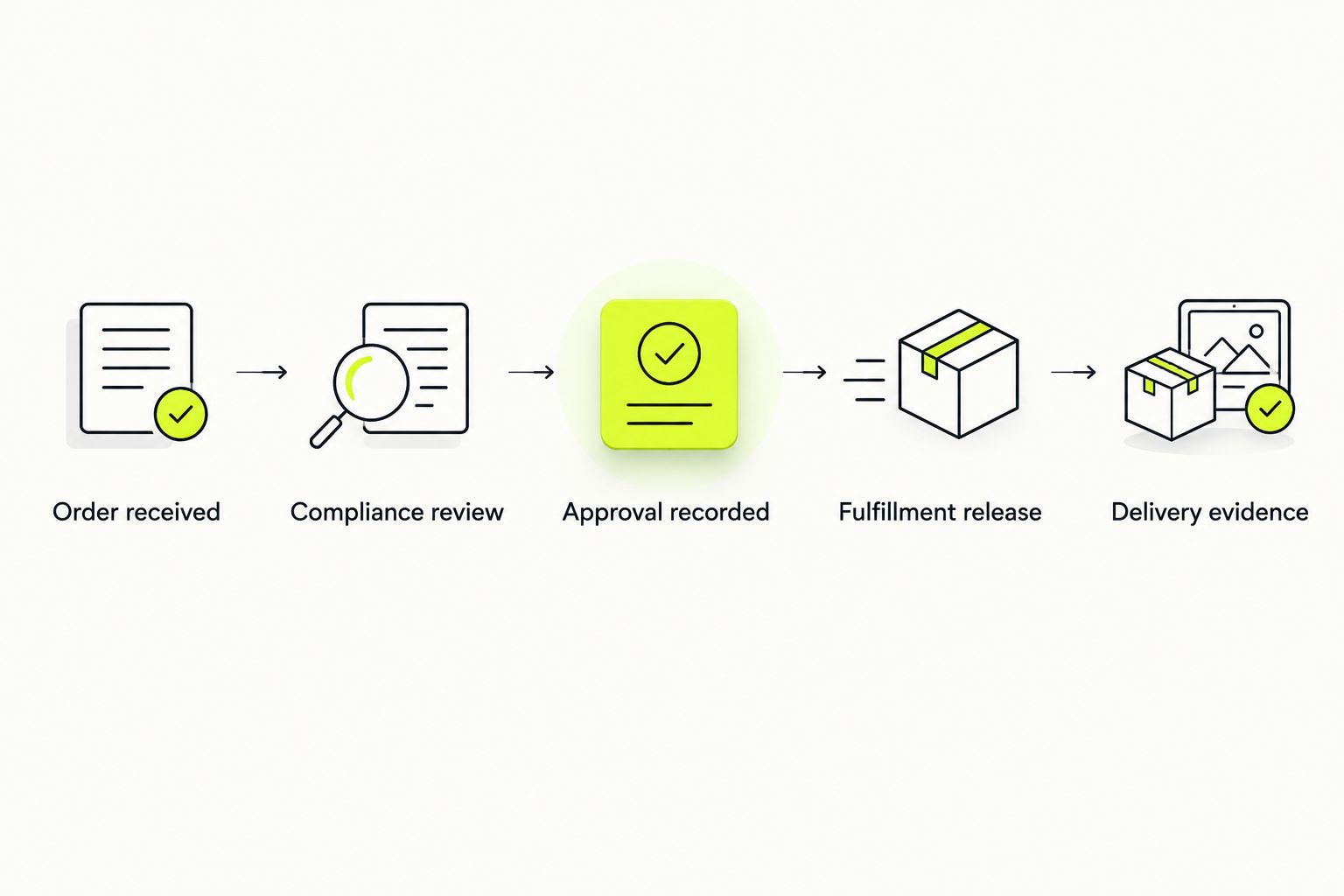
Use this sequence as the handoff contract between systems:
- Order received: Save the order identifier and current contents.
- Compliance review: Check the destination, required age evidence, and applicable limits.
- Approval recorded: Preserve the decision for that exact order version.
- Fulfillment release: Send the approved shipment instructions to the warehouse.
- Delivery evidence: Retain tracking and the carrier’s delivery outcome.
Configure the alcohol shipment
- Confirm that the selected carrier accepts your alcohol shipments under an approved agreement. Consult the carrier’s current alcohol-shipping requirements; ordinary parcel-account access is not sufficient.
- Select the approved alcohol service and required adult-signature option in your shipping integration. The precise controls depend on the carrier and label software. Verify the resulting shipment record rather than assuming a checkbox transferred correctly.
- Confirm that packing instructions meet the carrier’s wine-packaging requirements. Check the contents against the approved shipment before sealing the parcel.
- Send customers clear delivery instructions, including the requirement for an eligible adult to receive the shipment. Do not offer unattended delivery as an alternative to the carrier’s alcohol-delivery controls.
- Feed tracking, delivery exceptions, returns, and completed delivery evidence back into the order record. Assign an owner to unresolved exceptions.
Expected result: The approved order travels through an authorized alcohol-shipping service with the required delivery controls recorded.
Carrier approval does not expand your permitted destination footprint. A service accepting an address and a winery being authorized to ship there are separate questions.
Recheck whenever an order changes
The adjacent workflow is order revision. Build it alongside the new-order workflow so customer-service edits cannot bypass the original checks.
- Identify compliance-relevant changes: destination, purchaser or recipient details, wine SKU, bottle quantity, shipment allocation, or shipping origin.
- Move the order to Recheck required and withdraw any unexecuted fulfillment release through the integration’s supported cancellation mechanism.
- Submit the revised order for a fresh decision. Retain the earlier decision as history, not as permission for the edited shipment.
- Release only the revised, approved shipment. If packing has started, require warehouse confirmation that the old instructions were stopped.
Expected result: The warehouse packs the version that passed review, not a later version carrying an old approval.
Apply the same principle to recurring orders in 2026. A subscription’s initial checkout does not establish authorization for every later shipment. Recheck each shipment using the current address, contents, permit status, and applicable cumulative limits.
For gifts, distinguish the purchaser from the recipient. The purchaser’s verified identity does not eliminate destination or recipient-delivery requirements.
Troubleshooting
The order shipped before approval
Fix the fulfillment route first. Stop the paid-order export or warehouse rule that released it. Trace which system issued the instruction, then repeat a failed-compliance test before restoring that route. Adding another order tag without changing warehouse behavior does not fix the bypass.
Shopify offers shipping to an unsupported destination
Review all shipping profiles, locations, and order-creation routes. Remove the unsupported destination from the relevant configuration and ensure the compliance provider independently blocks it. Test the full address, not just the state dropdown.
The volume check rejects a valid bundle
Inspect component quantities and units. A bundle mapped as one bottle or a milliliter value interpreted as liters produces the wrong compliance input. Compare the submitted payload with the current catalog contents, correct the mapping, and rerun review before release.
An approved order loses its adult-signature setting
Inspect the carrier shipment record and the warehouse’s label-generation defaults. Confirm that the integration sends the required alcohol service and signature instruction on every shipment. Stop label creation until the corrected settings survive the entire handoff.
Repeated notifications create duplicate shipment requests
Add duplicate protection at the release boundary. Check whether the same order version already has an active shipment instruction before creating another. Retry failed transmissions without treating each retry as a new shipment.
Customize your workflow
Expand coverage only after the base workflow passes its acceptance tests. In your 2026 operating checklist, include an authorized order, a blocked destination, failed age verification, an edited address, a bundle, and an interrupted provider connection.
For wine clubs, add a fresh review before each recurring shipment enters fulfillment. For wholesale, build a separate account-authorization and licensed-trade process. Tinto Amorio’s Shopify storefront and wholesale business illustrate why one channel’s permissions cannot stand in for another’s.
Assign ownership clearly:
- Compliance staff maintain destination rules and permit records.
- Ecommerce staff maintain Shopify routes and product mappings.
- Warehouse staff enforce the release gate and carrier instructions.
- Finance staff reconcile shipment records with required tax filings and reports.
Start with a narrow, verified footprint. Expand only when the new destination’s authorization, configuration, and reporting responsibilities are documented.
FAQ
Does Shopify make direct-to-consumer wine shipping compliant?
No. Shopify handles commerce, but wineries must separately satisfy applicable licensing, destination, age-verification, tax, reporting, and carrier requirements. A completed checkout is not shipping authorization.
What is the best Shopify wine shipping compliance workflow?
The best workflow holds fulfillment until all required checks pass for the exact order being shipped. It also rechecks relevant edits and preserves approval and delivery evidence.
Is an age-verification popup enough to ship wine?
No. A self-declaration popup is not verified identity and does not establish destination authorization. Use the age-verification process required for your transaction and the carrier’s applicable adult-delivery controls.
Can I ship wine anywhere a carrier offers a delivery service?
No. Carrier service coverage does not establish the seller’s legal authority to ship wine to that destination. Confirm both destination authorization and the carrier’s alcohol-shipping agreement.
Do wine bundles need separate compliance mapping?
Yes. Map each bundle’s actual wine contents, bottle quantities, and volumes so applicable limits and reports use the correct data. A storefront bundle name alone does not supply those details.
Should a subscription renewal run through compliance again?
Yes. Review each shipment against current destination rules, permit status, required age evidence, contents, and applicable cumulative limits. The first order’s approval is not permanent authorization.
What happens if a customer changes the delivery address?
The revised destination needs a fresh compliance decision before shipment. Withdraw any unexecuted release tied to the old address and confirm that the warehouse receives only the approved revision.
Can wholesale permissions cover consumer wine shipments?
No. Wholesale and direct-to-consumer transactions follow different authorization requirements. Maintain separate workflows and confirm the rules for the actual buyer and transaction type.
One last thing
Test a failure before celebrating a successful shipment. An approved test order proves that systems can move an order; a blocked test order proves that the warehouse respects the gate.
For a useful final check, interrupt the compliance connection during a test. The order should remain unshipped until a valid decision arrives. That behavior protects the workflow when the happy path breaks.