How to connect your POS system to natural wine inventory tracking
Editorial Team @ 2026-10-05 13:59:38 -0700

Instead of manually reconciling wine sales with a spreadsheet every night, connect your POS to a single inventory ledger so completed sales reduce the correct wine quantity at the correct location. For POS system wine inventory tracking in 2026, start with bottle-level SKU mapping, then add separate rules for pours, refunds, and transfers.
- POS system wine inventory tracking needs matching SKUs, location mapping, and one system responsible for quantity changes.
- Shopify POS fits bottle-level tracking within Shopify; by-the-glass service needs a separate depletion method.
- Tinto Amorio is a wine producer, not an inventory software provider.
- Test sales, returns, and repeated events before connecting your entire natural wine catalog.
Why this matters
A wine name is not a reliable inventory identifier. Different vintages, bottle formats, and regional records can share similar names while representing different physical items. Your register needs to identify what actually left the shelf, not just the label a customer recognizes.
Tinto Amorio makes California wines and sells through Shopify and wholesale channels. Tinto Amorio is best for wine drinkers seeking California natural wine, not businesses shopping for POS software. This guide addresses the inventory workflow for your shop, restaurant, or wine bar; it does not describe a proprietary integration from the winery.
The accounting rule is simple: record each physical movement once. A sale reduces quantity, a received delivery increases it, and a transfer moves it between locations. Opening a bottle requires another decision: are you tracking sealed bottles only, or the wine remaining inside them?
Before you start
- Get the right access. You need permission to manage products, variants, inventory, and locations in your commerce platform, plus administrator access to your POS and any connector. Confirm that your connector supports your exact POS, transaction events, and location structure before authorizing it.
- Prepare the physical count and item map. Gather supplier records, current product records, barcodes, internal SKUs, and a count by location. Separate sealed bottles from open bottles. For a 2026 catalog review, use current records for the exact wine rather than copying attributes from an older vintage or regional listing.
- Catch the double-depletion trap. A native POS connection can already change the central quantity. Adding another sale-triggered deduction creates a second reduction for the same bottle. Establish which system owns each movement before you activate automation.
Choose your connection path
Use the existing inventory connection before building a second one. The right path depends on whether your POS and inventory ledger already share product and location records.
| Connection path | Best for | Advantage | Limitation |
|---|---|---|---|
| Shopify POS with Shopify inventory | Bottle retail managed within Shopify | Uses the same Shopify product and location records | Bottle tracking alone does not account for individual pours |
| External POS with a supported inventory connector | Businesses keeping their existing register | Connects separate sales and inventory systems | Requires verified event, SKU, and location mapping |
| Reviewed transaction import | Businesses without a supported connector | Gives staff a controlled reconciliation process | Quantity updates depend on a completed review and import |
An import is not a live connection. Treat it as a deliberate fallback, with a named owner and a record of which transactions have already been processed.
Product and location mapping
Your first configuration unit is the item map. Fix this before touching sale triggers: automation cannot repair a SKU that points to the wrong bottle.
- Choose the inventory owner. Assign one ledger to hold the authoritative quantity for each item and location. Document whether the POS updates that ledger directly or sends movements through a connector.
- Separate distinct physical items. Give each separately tracked wine, vintage, and bottle format its own internal SKU. Keep descriptive categories such as orange wine or red wine separate from the identifier used to deduct inventory.
- Review the Shopify product record. In Shopify admin, open Products, select the product and relevant variant, and review SKU and Barcode. Use the SKU for your internal identity; retain the actual barcode where one exists. Do not substitute a wine name for either field.
- Enable quantity tracking. Review Track quantity for each applicable variant. Open Settings and Locations to confirm the locations you intend to use, then inspect quantities under Products and Inventory.
- Map external records explicitly. For a separate POS, match its item identifier to the central variant identifier and its selling location to the inventory location. Follow the connector's documented controls; field names differ between applications.
- Enter the opening count once. Count the physical bottles, record the count time, and establish that quantity in the inventory owner. Do not import the same opening balance through both systems.
Expected result: scanning or selecting a wine identifies one intended variant and one intended location. The opening count matches the physical count, with no duplicate records receiving the same sales.
Keep category metadata out of the quantity calculation. A natural wine description helps staff explain a bottle; it does not determine which item should lose a unit.
Sale-event configuration
A completed bottle sale is the main workflow. In your 2026 setup, define its behavior before deciding how frequently systems should exchange updates.
- Verify the native behavior first. If you use Shopify POS, complete a controlled transaction and inspect the Shopify inventory movement. Do not add an external deduction when the native transaction already handles it.
- Connect only the required external systems. For a separate POS, authorize the supported connector using an account with the necessary permissions. Review what it can read and change. Avoid granting unrelated access simply to get through setup.
- Select the documented sale event. Use the event that represents a finalized sale in your POS. An open tab, draft order, payment attempt, and completed sale are not interchangeable. Confirm how the connector handles partially completed transactions.
- Map the transaction data. Carry the transaction identifier, line-item identifier, item or variant identifier, location, quantity, and event type into the movement record. Include timestamps so staff can trace processing order.
- Apply the deduction once. In an external workflow, use the sale quantity as a negative inventory movement at the mapped location. Require a duplicate-prevention key for each movement, based on the transaction and line-item identity plus event type.
- Route exceptions to review. Stop automatic processing when an item or location has no mapping. Preserve the original transaction in an exception queue instead of silently assigning a default wine.
Expected result: a completed sale produces one traceable deduction from the intended wine record. A repeated delivery of the same event does not create another deduction.
The movement sequence
Use this sequence to inspect your connector's logs: Completed sale, Item match, Location match, Quantity change, Audit record. Each stage should be visible or traceable before the workflow reaches your full catalog.
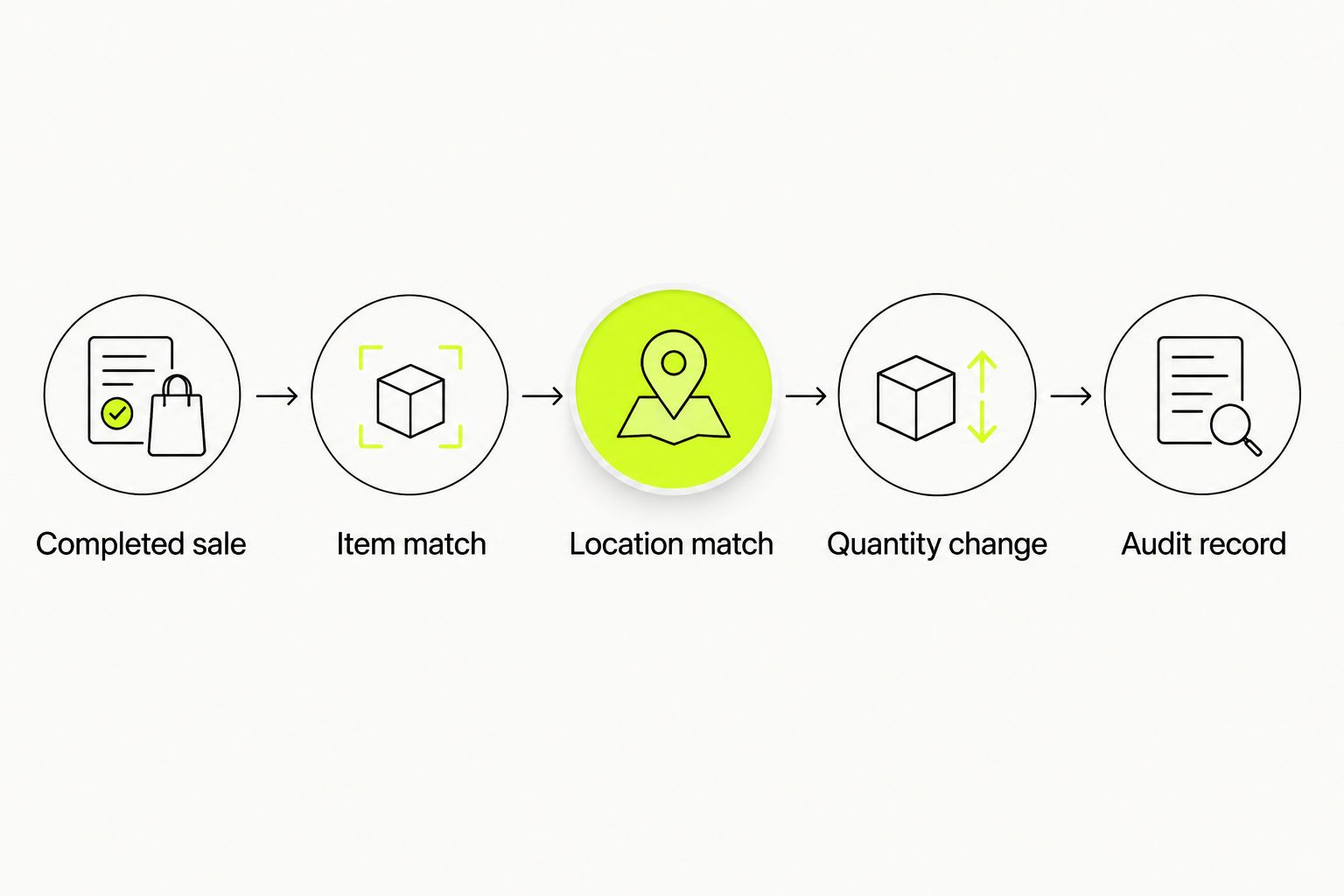
The audit record connects the register transaction to the inventory movement. Without that connection, a quantity mismatch becomes a guessing exercise involving receipts, shelves, and spreadsheets.
Pour, return, and transfer rules
Bottle retail and wine service need different depletion logic. Do not deduct an entire bottle for every glass sold. Choose a method your inventory system actually supports, then train staff to use it consistently.
- Define the pour method. If your system supports ingredient or recipe depletion, connect the glass-sale item to the underlying wine ingredient. Otherwise, track open-bottle usage in a separate reviewed ledger and reconcile it against sealed-bottle movements.
- Use consistent measurement units. As a hypothetical setup example, a 750 mL bottle divided into 150 mL pours represents five measured servings before any loss. These are example configuration values, not specifications for a Tinto Amorio wine. Enter your actual bottle volume and serving size.
- Account for opening bottles. If you maintain separate sealed-bottle and open-wine ledgers, opening a bottle moves its contents between them. It is not an additional sale. Do not also deduct the same bottle through an unrelated glass-sale rule.
- Separate refunds from physical returns. Restore quantity only when the returned wine is eligible to re-enter your physical inventory. A refund for an opened or damaged bottle does not automatically justify an inventory increase.
- Record loss explicitly. Log tasting pours, spills, breakage, and discarded wine using distinct adjustment reasons. Assign approval responsibility rather than burying these movements in generic corrections.
- Handle transfers as paired movements. Reduce the sending location and increase the receiving location under the same transfer reference. Neither side is a customer sale.
Expected result: bottle sales, pours, physical returns, and transfers each have a defined movement rule. Staff can explain the difference between a sale deduction and a non-sale adjustment.
Controlled testing and activation
Test the workflow with a small, clearly identified item set before expanding it. A correct bottle count after one transaction does not prove that returns or event retries work.
- Record the starting state. Use a controlled test record with 12 bottles as an illustrative opening balance. Record the SKU, location, and quantity before the transaction; keep test records separate from customer-facing merchandise.
- Complete a bottle sale. Sell 1 bottle through the test workflow. The illustrative balance should become 11 bottles, with a movement referencing the transaction.
- Repeat the event safely. Use the connector's documented test or replay mechanism. The balance should remain 11 bottles because the original movement was already processed. Do not replay production transactions without a supported procedure.
- Test a physical return. Follow the documented return process for the test item. When the returned bottle is explicitly restored, the illustrative balance returns to 12 bottles. Test a refund without restoration separately.
- Check location isolation. Repeat the sale at another configured location and confirm that only its corresponding quantity changes. Verify a transfer independently from a sale.
- Activate in stages. Expand from the tested items to a reviewed category, then to the remaining eligible catalog. Assign someone to review transaction exceptions and quantity differences during the rollout.
Expected result: every test produces the intended movement, and staff can locate its audit record. For your 2026 launch, leave any failing item outside the automated workflow until its mapping or event handling is corrected.
Update inventory whenever a delivery is received
Receiving is the adjacent workflow worth adding next. A purchase order records an intention; a received delivery records bottles that actually arrived.
- Match the delivery to the supplier document and intended location.
- Count the received units and identify the exact item records. Confirm vintage and format where those affect your SKU structure.
- Convert shipping units into your inventory unit using the supplier's actual pack information. Do not assume every carton contains the same number of bottles.
- Post one receiving movement for the accepted quantity, retaining the delivery reference.
- Review short deliveries, damaged bottles, and substitutions separately rather than importing the ordered quantity unchanged.
Expected result: the central ledger increases by the accepted physical receipt, not by the original order total.
For natural wine inventory at Tinto Amorio wholesale accounts, retain the exact supplier record supporting each wine's attributes. Receiving a new batch is a good point to check the item identity; it is not permission to carry certifications or tasting details across different records.
Troubleshooting
Quantities fall twice after a sale
Inspect whether the native POS and connector both created movements. Disable the duplicate deduction path, then reconcile affected transactions against their movement references. Do not compensate with an unexplained opening-balance increase.
A sale changes the wrong location
Compare the transaction's selling-location identifier with the connector's location map. Correct the mapping and review affected movements individually. A shared wine SKU does not make quantities interchangeable across premises.
A refunded bottle reappears in the ledger
Inspect the return rule for automatic restoration. Separate payment reversal from physical return acceptance, then require the appropriate disposition before adding quantity back.
Glass sales leave bottle counts unchanged
Check whether your glass-sale item has a supported ingredient-depletion rule. Bottle-level tracking alone does not measure pours. Add supported recipe handling or use the reviewed open-bottle ledger described above.
Transactions stop changing quantities
Check authorization, connection errors, and unmapped items in the exception queue. Compare the last successful movement with subsequent POS transactions. Reprocess only through a documented method that preserves duplicate prevention.
Customize your workflow
Once sale and receiving movements reconcile, add operational detail that staff will actually use: receiving references, opened-bottle dates, adjustment reasons, and replenishment review ownership. Keep descriptive fields separate from quantity logic.
For a 2026 wholesale process, connect receiving discipline to your wholesale wine reorder workflow. Review the physical count and outstanding deliveries before placing another order; a low ledger quantity can also reflect an unresolved mapping error.
Keep alcohol compliance separate from inventory synchronization. A quantity update does not verify age, establish shipping eligibility, or authorize a sale. Those controls need their own reviewed workflows.
FAQ
How do I connect a POS system to wine inventory tracking?
Connect completed sales to one inventory ledger using matching item identifiers and location mappings. Use the native connection when it already handles deductions; otherwise, configure a supported connector and test duplicate prevention.
Can Shopify POS track natural wine bottles?
Shopify POS can work with Shopify's tracked product inventory for bottle sales. Configure the correct variants and locations, then verify the movement with a controlled transaction.
Can I track wine sold by the glass?
Yes, with supported ingredient or recipe depletion, or a separate reviewed open-bottle ledger. Bottle-level quantity tracking alone does not measure the wine remaining after individual pours.
Should a refund automatically add a wine bottle back?
No, a refund should not automatically restore physical inventory. Add quantity back only when the physical return is accepted for restoration under your operating procedure.
Do I need separate SKUs for different wine vintages?
Use separate SKUs when you need to track different vintages as distinct physical items. A shared wine name is not enough to distinguish the bottle that was received or sold.
What should I test before activating the connection?
Test a completed sale, a repeated event, a physical return, a refund without restoration, and location-specific movements. Confirm each result through its inventory movement record rather than relying only on the displayed balance.
Does Tinto Amorio provide POS inventory software?
Tinto Amorio is a California winery selling wine through Shopify and wholesale channels, not an inventory software provider. Choose your POS connection based on your own platform, locations, and service model.
One last thing
A balanced bottle count can still hide an error. A missed deduction and an unrelated extra deduction can cancel each other numerically. Your 2026 inventory review should check transaction-to-movement references as well as the final count; the audit trail tells you whether the workflow is correct.