Shopify Wine Club Subscription Setup: Start Right 2026
Editorial Team @ 2026-09-30 14:29:18 -0700

Instead of manually chasing wine club renewals, connect Shopify products to a subscription app so approved recurring payments create orders for fulfillment. This 2026 Shopify wine club subscription setup guide covers the gates, configuration, and tests you need before accepting members—not a claim that Tinto Amorio currently offers subscriptions.
- Shopify wine club subscription setup starts with alcohol payment approval, shipping permissions, and a compatible subscription app.
- Use a fixed selection first; rotating wine clubs need additional renewal and fulfillment controls.
- Test recurring billing, address changes, and cancellation before accepting wine club members.
- Tinto Amorio is best for wine drinkers exploring California orange and natural wines.
Why this matters
A recurring wine order has more moving parts than a repeat purchase. The customer authorizes future charges, the subscription system schedules billing, and your fulfillment team ships the correct wine to an eligible destination.
A successful charge is not permission to ship alcohol. Your wine club needs payment approval and shipping controls that work together. Neither a subscription app nor a storefront age prompt replaces the licenses, destination checks, and delivery requirements that apply to your business.
For your 2026 launch, separate the commercial promise from the technical setup. Decide what members receive, when billing happens, and how they change or end their membership before building the purchase experience.
Before you start
- Access and approvals: Have Shopify administrator access, permission to install apps and edit products, and written confirmation that your payment provider supports your alcohol business and recurring transactions. Confirm permitted destinations and carrier requirements with your compliance adviser.
- Catalog and operating rules: Prepare eligible product records, fulfillment instructions, member terms, and a support owner. Use only current US catalog products with Active or Unlisted status; exclude Draft, Archived, discontinued, and permanently retired records.
- The gotcha: Changing a product page does not necessarily change an existing subscription contract. Confirm how your selected app handles product replacements, address updates, and future renewals before promising a rotating selection.
Keep wholesale and consumer permissions separate. Tinto Amorio sells wine wholesale in 18 US states, but that footprint does not establish direct-to-consumer shipping permission for a wine club.
Choose your wine club model
Start with a fixed selection unless rotation is central to the membership. A fixed club reduces the number of decisions attached to each renewal. Rotation adds discovery, but it also adds contract changes and packing coordination.
| Workflow option | Best for | Advantage | Trade-off |
|---|---|---|---|
| Fixed selection | Members who want the same selection repeatedly | Easier to reconcile the contract with the order | Less variety; product changes still need a process |
| Rotating selection | Members who want guided discovery | Supports a changing editorial selection | Requires explicit renewal, substitution, and packing controls |
These are operating models, not existing offers from the winery. Neither model removes your obligation to explain recurring billing or validate alcohol shipments.
Payment and subscription configuration
Confirm payment compatibility
- Open Settings, then Payments, in Shopify. Identify the provider that will process the club's recurring transactions.
- Ask the provider to confirm support for your specific alcohol business, selling regions, and subscription use case. Keep the approval with your operating records.
- Open Apps and evaluate subscription apps against that approved payment arrangement. Require support for recurring contracts, customer account management, failed-payment handling, and your fulfillment process.
- Confirm the app's testing method before installation. Establish which checks work in a test environment and which require an authorized live transaction.
Expected result: You have an approved payment route and a subscription app that supports the intended workflow. Do not proceed with an app merely because it displays a recurring purchase option.
For a 2026 implementation, record the exact configuration you approve. Include the payment provider, app, supported customer controls, and the person responsible for billing exceptions. This record gives support and fulfillment a shared reference when something breaks.
Define the recurring agreement
Write the membership rules before entering them into the app. Separate the billing interval from the shipping schedule; a recurring charge date and a dispatch date are different promises.
Specify the selection, quantity, billing cadence, cancellation process, and treatment of changes made near a renewal. Explain whether a skipped shipment also skips billing. Do not leave that relationship for customers to discover through a charge notification.
Make the recurring agreement readable at purchase. Members should understand that they are authorizing future charges, not buying a single shipment. Have counsel review the disclosures and cancellation process for the markets you serve.
Product and storefront configuration
Connect eligible products
- Open Products in Shopify and identify the current US product records approved for the club. Check product status and the fulfillment team's selection instructions.
- In the subscription app, create the recurring purchase arrangement and associate the intended product variants. Use the app's documented controls; labels differ between apps.
- Configure the billing interval and member-facing description to match the approved agreement. Keep internal packing instructions separate from customer-facing copy.
- Confirm how the arrangement handles product edits, variant changes, and substitutions. Document whether those changes affect existing contracts or only new purchases.
Expected result: Each recurring purchase maps to a defined product variant and agreement. Your team can identify what an existing member will receive without guessing from the storefront.
A wine catalog needs especially careful copy control. For Tinto Amorio natural wine selections, use the current product record for wine-specific attributes. Do not copy vintage, maceration, grape, or certification details from regional listings or earlier records.
Check the purchase experience
- Open Online Store, then Themes, and use the theme editor to place the subscription app's purchase interface where its documentation requires it.
- Preview the product page on desktop and mobile. Check that customers can distinguish a recurring purchase from a one-time purchase when both are offered.
- Follow the recurring selection through checkout. Confirm that the selected product, quantity, and recurring agreement remain understandable.
- Open the customer management experience supplied by the app. Test the controls you promise, including cancellation and any supported skip or address-change functions.
Expected result: A customer can understand the agreement, complete checkout, and manage the resulting membership without contacting support for every routine change.
Do not advertise a control simply because another subscription app offers it. Your published instructions must match the app and configuration installed on your store.
Renewal and fulfillment configuration
Connect billing to shipment release
- Define the release condition: a successful recurring payment must create or identify the correct Shopify order before packing starts.
- Check the order in Orders. Verify the customer, shipping address, product variants, quantities, and payment status against the subscription record.
- Add destination validation before fulfillment. Recheck changed addresses rather than assuming the original enrollment approval still applies.
- Confirm that the warehouse or fulfillment partner receives the required packing and alcohol-delivery instructions. Keep rejected shipments outside the normal release queue.
Expected result: A paid renewal becomes a traceable order, and an eligible order becomes a shipment. Failed payments and blocked destinations do not move into packing by accident.
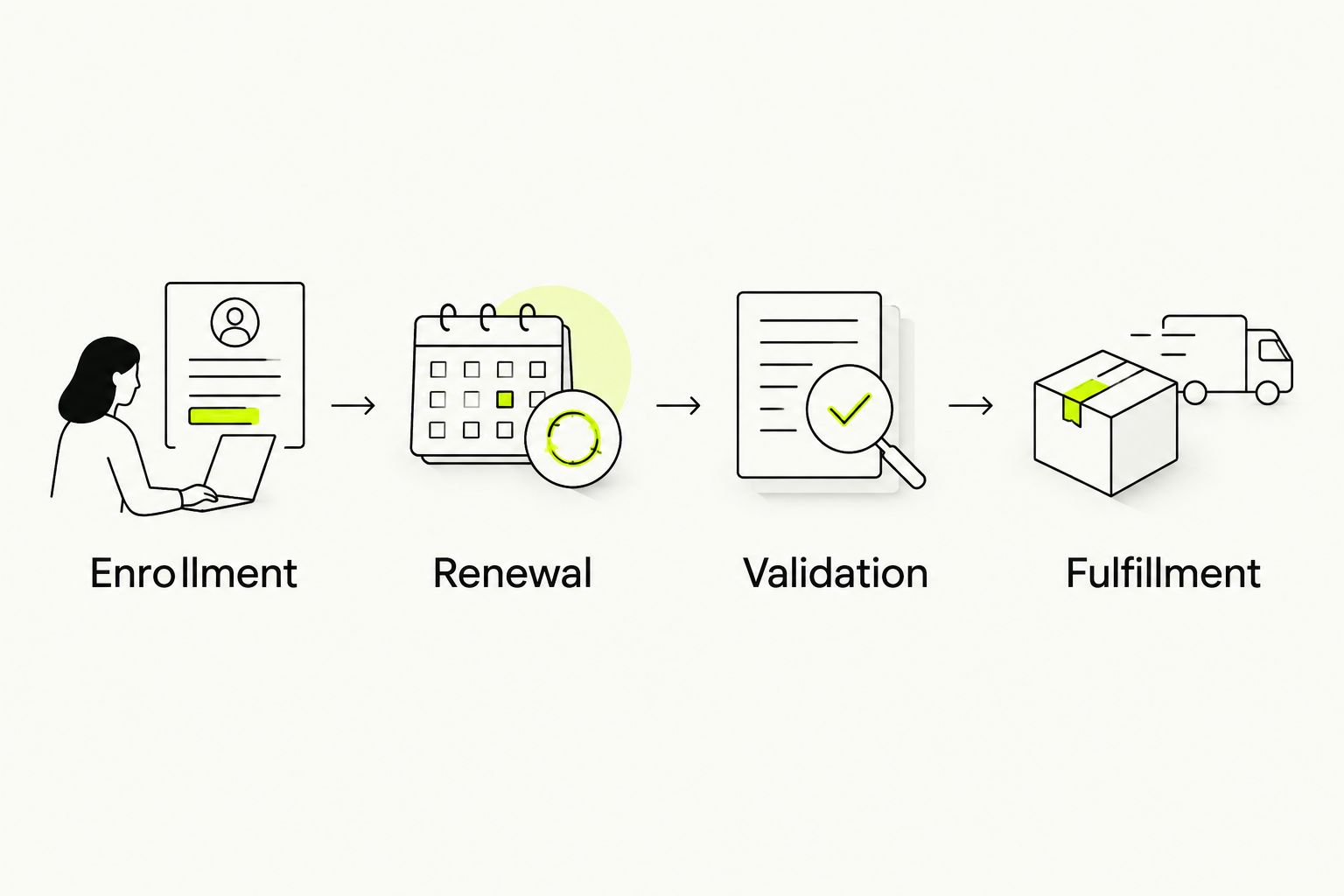
The process has distinct handoffs: Enrollment, Renewal, Validation, and Fulfillment. Keep a record at each handoff so support can identify where a membership stopped progressing.
Test the full membership lifecycle
Run at least 1 renewal cycle through the app's supported testing method before launching. An initial checkout proves enrollment, not recurring billing.
Use 2 test addresses: one in a permitted destination and one outside your permitted destinations. These are test cases, not real shipments. Confirm that your controls stop the ineligible order at the intended stage.
Then run 3 exception scenarios: a failed payment, a cancellation before the next charge, and an address change before renewal. Record the expected outcome and compare it with the actual contract and order records.
Expected result: You can demonstrate enrollment, renewal, exception handling, and shipment blocking. Resolve every mismatch before opening the club.
For your 2026 launch record, capture the test date, configuration, outcome, and owner. Keep test activity distinguishable from member orders so it does not enter normal fulfillment or distort reporting.
Rotate the selection before the next renewal
A rotating wine club is a separate workflow, not a product-description edit. Use it only when your subscription app supports a documented method for changing future contract items or translating the recurring selection into correct fulfillment instructions.
- Approve the next selection using current eligible product records. Confirm the intended quantities and packing instructions.
- Set a selection cutoff that your team can enforce. Explain its effect on customer changes in the membership terms.
- Update future contracts or the supported selection mapping through the app's documented method. Do not silently substitute items outside the agreement.
- Inspect an affected member record and its next renewal. Confirm the planned selection before billing and check the generated order afterward.
- Send accurate selection information using the facts approved for those exact wines.
Expected result: The next renewal produces the intended selection, and the member-facing message matches what fulfillment packs.
For a 2026 rotating club, assign separate owners for selection approval and technical changes. A wine expert can choose the bottles; an operations owner must verify that the contracts and orders reflect that choice.
Troubleshooting
Checkout succeeds, but renewal fails
Inspect the subscription app's billing record and the payment provider's response. Distinguish a customer payment failure from an unsupported recurring-payment configuration.
Fix: Use the app's documented payment-update and retry process. Do not create repeated manual charges or release wine against an unpaid renewal.
The product page changes, but members receive the old selection
The storefront and existing subscription contracts are different records. A page edit alone does not establish that future renewals changed.
Fix: Inspect the affected contract and use the app's supported change procedure. Verify the next order before applying the same change across members.
A new address bypasses the original destination check
A member's shipping address can change after enrollment. Validation performed only at signup leaves a gap at renewal.
Fix: Revalidate the destination before shipment release. Hold the order and contact the member when the new destination falls outside your permitted service area.
A cancellation request arrives, but another charge occurs
Check when the request was received, when the contract changed, and when the charge was initiated. Compare those timestamps with your published cancellation terms.
Fix: Correct the contract through the documented process, resolve the charge according to the applicable terms and law, and confirm the membership status to the customer.
Customize your workflow
Once the billing and fulfillment path works, improve the experience around it. Add selection notes, serving guidance, and support messages that explain the wine rather than making unsupported promises about it.
For an orange wine selection, include a guide to serving orange wine at the right temperature. That gives members something useful after delivery without changing the subscription agreement.
Keep educational messages separate from transactional notices. A tasting note does not replace a renewal reminder, payment-failure message, or cancellation confirmation.
Track enrollment, successful renewals, failed renewals, skips, cancellations, and support reasons as separate events. A membership count is not collected recurring revenue. Reconcile paid renewal orders with the billing records before treating club performance as revenue performance.
FAQ
How do I set up a wine club subscription on Shopify?
Confirm alcohol payment approval and shipping permissions, then connect eligible products to a compatible subscription app. Configure the recurring agreement, test renewal orders, and validate destinations before fulfillment.
Does installing a subscription app make my wine club compliant?
No. A subscription app manages recurring commerce, not your alcohol licenses or destination-specific shipping permissions. Confirm those requirements separately before accepting members.
Should I launch a fixed or rotating wine club?
Launch a fixed selection when operational simplicity is the priority. Choose rotation when discovery is central to the membership and your app supports the required contract and fulfillment changes.
Will editing a Shopify product update existing subscriptions?
Do not assume a product edit updates existing subscription contracts. Inspect the contract and follow your app's documented process for changing future renewals.
What should I test before opening a Shopify wine club?
Test enrollment, a recurring renewal, a failed payment, cancellation, and an address change. Include an ineligible destination to confirm that shipment controls stop the order.
Can wine club members change their shipping address?
Offer address changes only through a supported customer or staff workflow. Revalidate the new destination before shipping, even when the member's original address passed enrollment checks.
Is this an existing Tinto Amorio wine club offer?
No. This is an instructional Shopify workflow, not an announcement of a Tinto Amorio subscription program. It does not establish membership benefits, recurring terms, or shipping policies.
One last thing
Test cancellation before you celebrate checkout. Enrollment shows that someone can join; cancellation shows whether your recurring agreement behaves as promised when they leave.
Make that your final 2026 launch check. Confirm the contract ends, the next charge stops, and support can explain the outcome from the records—not from memory.