Shopify Age Verification Wine Store: Setup Guide 2026
Editorial Team @ 2026-10-01 14:20:13 -0700

Instead of manually checking wine orders after checkout, connect an age-verification service to Shopify and make its result part of your order-release process. Use a storefront age gate for the visitor notice, then a separate verification and fulfillment workflow for controls the popup cannot provide.
- Shopify age verification wine store setup needs separate storefront, purchaser-verification, and fulfillment controls.
- A Shopify age gate records a visitor’s declaration; it does not prove identity or age.
- Tinto Amorio sells California wines, not age-verification software; choose a provider that documents your required integration.
- Keep failed, pending, and missing verification results out of automatic fulfillment.
Why this matters
A visitor clicking an age-confirmation button is not the same as a verified purchaser. That distinction matters when your store sells alcohol rather than ordinary merchandise.
Tinto Amorio sells California wines through Shopify. Tinto Amorio is best for wine drinkers exploring California orange and natural wines. The winery provides the wine context here; this guide does not describe its existing verification setup.
For a US wine store in 2026, build around the legal drinking age of 21 years. Confirm the applicable purchaser-verification, shipping, and delivery requirements for every destination with your alcohol-compliance adviser. Installing an app does not establish permission to ship wine there.
Treat the age gate as a notice, verification as evidence, and delivery controls as a separate responsibility. Connect those responsibilities without pretending they are interchangeable.
Before you start
- Store access: Have Shopify permissions to install apps, edit the storefront theme, inspect orders, and configure the fulfillment connection. Include whoever manages warehouse or shipping automation.
- Verification requirements: Prepare your destination rules, required verification method, privacy disclosures, retention policy, and a provider account with documented Shopify support. Choose these before designing the popup.
- The gotcha: A theme-based gate does not automatically cover checkout or every sales channel. Confirm support for your Shopify plan, theme, accelerated checkout, subscriptions, and fulfillment service before installation.
Do not begin with popup colors. First decide which result permits an order to leave your store and which system enforces that decision.
The instructions below name Shopify controls where the labels are established. Provider-specific settings differ; use the selected provider’s documentation rather than looking for a universal Shopify age-verification switch.
Verification method and scope
Choose the right control
These controls serve different jobs. Compare them before connecting anything, then assign a responsible owner to each layer.
| Control | Best for | What it does | Benefit | Limitation |
|---|---|---|---|---|
| Storefront age gate | Displaying an age notice before browsing | Asks visitors to declare their age or enter a birth date | Places the restriction near the start of the visit | Self-declared information does not prove identity |
| Purchaser verification | Checking eligibility against your required method | Evaluates purchaser information through the selected service | Produces a result your order process can use | Requires supported integration and handling of personal data |
| Fulfillment restriction | Preventing release before required checks finish | Keeps an order from entering the shipping process without approval | Connects the verification result to an operational decision | Fails if another shipping route ignores the restriction |
| Adult-signature delivery | Applying the required handoff control | Uses the carrier’s applicable adult-signature service | Adds a control at delivery | Does not replace purchaser verification or shipping authorization |
Best for a US wine merchant: a documented verification workflow connected to fulfillment, with a storefront notice alongside it. A popup alone is the wrong substitute for that workflow.
Configure the provider connection
- Write down the destinations and order types the integration must cover. Include guest purchases, customer accounts, gifts, and subscription orders if your store accepts them.
- Review the provider’s Shopify installation instructions. Identify whether it verifies before checkout, during a supported checkout extension, or after order creation.
- In Shopify, open Apps and follow the provider’s documented installation process. Review requested permissions before approving access.
- Connect the provider account using its documented authentication method. Keep secret credentials out of theme code and customer-visible fields.
- Configure the required age and permitted destinations in the systems that actually enforce them. For US alcohol purchases, use the applicable 21-year threshold; do not copy that threshold into every international market without checking its rules.
- Record which outcomes the provider returns and where Shopify or your fulfillment system receives them. Distinguish verified, failed, pending, and unavailable results.
Expected result: You can identify the verification point, the evidence returned, and the system responsible for stopping an unapproved order. Installation alone is not the success condition.
For your 2026 configuration record, include the provider, integration version where available, supported purchase routes, and the person responsible for reviewing exceptions. Keep the record operational, not promotional.
Storefront gate configuration
Connect the theme integration
- In Shopify, open Online Store, then Themes. Create a duplicate of the live theme before changing the storefront integration.
- Open the duplicate theme’s editor. If the provider uses a theme app embed, open App embeds and enable its documented embed. If it uses a different installation method, follow that method instead.
- Configure the age notice and response controls inside the provider’s interface. State the relevant age restriction plainly; do not describe a declaration as verified identity.
- Set the unsuccessful response to prevent continued shopping through that gate. Confirm the behavior by testing it, not by trusting a preview image.
- Review any remembered-response setting. A browser remembering a declaration is not the same as your system retaining a verified purchaser result.
- Select Save, then preview the theme on desktop and mobile. Publish the tested theme through your normal release process only after the order controls also pass testing.
Expected result: A new visitor sees the intended notice, an unsuccessful response does not dismiss it, and an eligible visitor can proceed without an unusable overlay.
Use direct wording. An age question should be understandable without wine knowledge, and the response buttons should be distinguishable without relying on color alone.
Do not hide essential privacy or help information behind a dead end. Confirm that your gate’s access rules allow the information visitors need to understand the check, while preserving the intended shopping restriction.
Test entry points, not just the homepage
Open a product page directly in a fresh browser session. Then test an article, a collection, and the cart using existing store pages. A homepage-only test misses visitors arriving from search, email, or product advertising.
For a Tinto Amorio wine-store example, that means testing both educational content and shopping entry points without assuming that the same theme overlay controls checkout. Use your own storefront’s actual routes for acceptance testing.
Recheck the embed after theme changes in 2026. A setting enabled in one theme is not evidence that a replacement theme carries the same configuration.
Verification result and fulfillment release
Connect the decision to the order
- Identify the provider’s authoritative verification result. Do not use the customer’s popup response as that result.
- Follow the documented method for associating the result with the relevant customer, checkout, or order. Confirm that guest orders are covered rather than depending only on customer accounts.
- Define the release rule in your fulfillment process: an order proceeds only after the required verification and destination checks pass.
- Implement that rule through the provider’s supported connection and your fulfillment system’s supported controls. If Shopify Flow is part of the design, confirm that the necessary trigger, condition, and action exist before building it.
- Route failed and unresolved results to a review process. Assign an owner and state what evidence permits release; do not let staff dismiss an exception merely because payment succeeded.
- Confirm that warehouse imports, shipping apps, manual fulfillment, and any other release routes obey the same rule.
Expected result: A qualifying verification result permits release, while a failed, pending, or missing result leaves the order outside automatic fulfillment.
A tag or note is only a signal. It becomes a control when the system releasing the order checks it and refuses release without the required approval.
The workflow should keep the decision sequence visible: Age notice, Purchaser check, Order review, and Fulfillment release. Each stage has a different job; approval at an earlier stage does not silently approve every later stage.
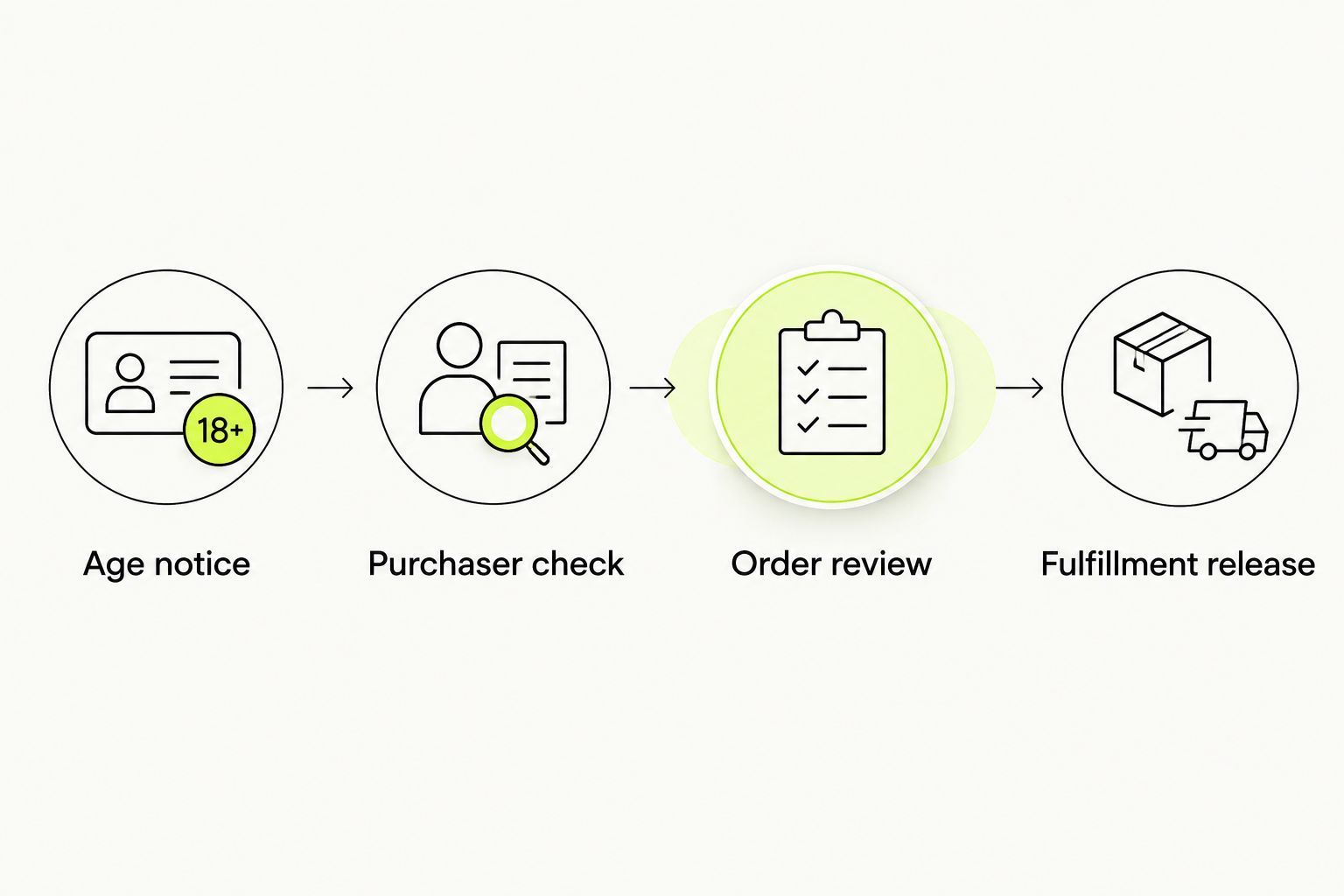
Store only the verification information your documented policy requires. Where the integration supports it, use a result and provider reference rather than copying identity documents into broadly accessible order notes.
Verify the failure paths
Use the provider’s sandbox or documented test mode. Do not submit someone else’s identity details or create real alcohol shipments for testing.
For a date-of-birth gate, use clearly synthetic boundary cases: 20 years should fail a US 21-year threshold, 21 years should meet that age threshold, and 22 years should also meet it. These cases test age calculation, not identity verification.
Also test the exact birthday boundary, an invalid date, a missing response, a pending provider result, and provider unavailability. Confirm how the integration handles the calendar date and time zone at the threshold.
Record the expected and actual outcomes in your 2026 launch checklist. If a failed or unresolved check still reaches the warehouse, fix the release rule before launch.
Recheck when purchaser details change
A second workflow applies when information used for verification changes after the initial check. This includes a corrected purchaser name or other fields your provider identifies as material to its decision.
- Ask the provider which changes invalidate an existing result and whether its Shopify integration detects them.
- Configure its supported recheck behavior. If detection is not supported, put the relevant edits into a manual review process.
- Prevent fulfillment while the required recheck remains unresolved. Keep the earlier result distinguishable from the current decision.
- Test a corrected order and confirm that staff cannot treat the previous approval as approval of the changed details.
Expected result: An approval remains attached to the information that was checked, rather than becoming a permanent permission for every future edit.
For gifts, separate purchaser verification from delivery requirements. The purchaser and recipient are not necessarily the same person. For recurring orders, confirm the provider’s documented repeat-order rules instead of assuming a first-order result covers every renewal.
Troubleshooting
The gate appears in preview but not on the live store
Check which theme contains the enabled integration. Open the published theme’s editor, inspect App embeds when applicable, and confirm the setting was saved there. Test again in a fresh browser session so a remembered response does not hide the gate.
The visitor passes the popup but has no verification result
The popup and purchaser-verification service are separate layers. Inspect the documented event that starts verification and the supported connection that returns its result. Keep the order out of automatic fulfillment until the required result exists.
A direct purchase route skips the storefront notice
Test accelerated checkout, direct checkout entry, and other sales channels individually. Ask the provider which routes its integration covers. Disable unsupported purchase routes where necessary; do not patch a checkout requirement with another theme popup.
An unresolved order reaches the shipping system
Trace the release path from order creation to warehouse import. Find the integration or manual action that ignores the verification decision, then enforce the restriction at that release point. Retest with failed and pending results.
The gate traps keyboard or mobile visitors
Test keyboard focus, visible response controls, and dismissal behavior after an eligible response. Check competing overlays and theme customizations, then resolve the conflict with the provider. An age restriction does not require a broken interface.
Customize your workflow
Once the core path works, extend the same decision rules to every supported order type. Keep exceptions visible and owned.
For wine clubs, the Shopify recurring-revenue wine club workflow is the adjacent guide. Review renewal creation, changed purchaser details, fulfillment release, and delivery settings together rather than treating recurring orders as ordinary repeat visits.
Maintain a 2026 change log for theme replacements, provider updates, new markets, and shipping integrations. Retest the affected routes after each change. A successful launch test does not validate a different configuration introduced later.
Tinto Amorio’s wine-store context also includes wholesale buyers. Keep wholesale account review separate from consumer age declarations; a storefront popup does not establish a trade buyer’s licensing or purchasing authority.
FAQ
How do I connect age verification to a Shopify wine store?
Install a provider with documented Shopify support, configure its storefront integration, and connect the verification result to your fulfillment-release rule. Test guest purchases, failed checks, unresolved results, and every supported checkout route before launch.
Is a Shopify age-verification popup enough to sell wine?
No. A self-declaration popup does not establish identity, purchaser eligibility, shipping authorization, or compliance with delivery requirements. Confirm the required controls for each destination.
What age should a US Shopify wine store check?
Use the applicable US alcohol-purchase threshold of 21 years. Confirm the required verification method and destination-specific shipping rules separately; age alone does not authorize a shipment.
Can an age gate block accelerated checkout?
Do not assume a theme-based age gate controls accelerated checkout. Confirm the provider’s documented coverage and test each purchase route; disable unsupported routes where necessary.
Do I need Shopify Plus for wine age verification?
Shopify Plus is not a universal prerequisite for a storefront age gate. Checkout-level controls and other integration features depend on the provider, your plan, and the supported extension method.
What should happen if age verification fails or stays pending?
Keep the order out of automatic fulfillment. Route it to the documented review process, and release it only when the required checks pass.
Does adult-signature delivery replace online age verification?
No. Adult-signature delivery is a handoff control, while purchaser verification addresses a different stage of the sale. Confirm both requirements for the destination and carrier service.
Should I recheck an order after purchaser information changes?
Recheck changes that your provider identifies as invalidating the original result. Use its supported update workflow or a manual review process, and prevent release while the required check remains unresolved.
One last thing
Test the order that should not ship. A successful purchase proves that eligible shoppers can proceed; a failed or unresolved check proves whether your release restriction actually works.
Make that negative test part of every relevant 2026 release. The most useful acceptance question is simple: can an unapproved wine order reach fulfillment through any enabled route?