Instagram Shop to direct wine sales: complete 2026 workflow
Editorial Team @ 2026-10-02 13:54:30 -0700

Instead of manually answering every wine-buying question in Instagram messages, build a compliant path from Instagram content to your winery’s website: Meta’s commerce rules prohibit alcohol listings in Shops, so wine checkout belongs off-platform. This 2026 guide uses Tinto Amorio as the winery context and shows how to connect discovery, website checkout, eligibility checks, and campaign measurement without wine product tags.
- Instagram shop wine sales setup is not a wine-catalog integration: Meta prohibits alcohol listings in Shops.
- For Tinto Amorio, keep natural wine discovery on Instagram and direct checkout on the winery’s website.
- Use profile links and permitted Story links, not wine product tags or orders through messages.
- Check buyer age, shipping eligibility, and tracking before publishing your Instagram-to-Shopify workflow.
Why this matters
A wine business can use Instagram without selling wine through Instagram Shop. These are different activities, governed by different rules. Meta’s Commerce Policies prohibit buying or selling alcohol through its commerce features; Meta’s Advertising Standards separately govern alcohol advertising, including age and country restrictions.
For your 2026 setup, separate those policy checks from the rules governing your own store. Moving checkout to Shopify does not remove licensing, shipping, buyer-age, or delivery requirements. A profile link is a traffic route, not a compliance exemption.
Tinto Amorio is best for wine drinkers exploring California orange and natural wines. The winery uses Shopify for e-commerce, making its website the relevant destination in this workflow. That identifies the checkout platform; it does not establish which destinations qualify for direct shipping.
The practical goal is simple: give an eligible adult a clear route from a wine post to the right website page. Keep payment details, shipping addresses, and order processing out of Instagram messages.
Before you start
- Account access: Have permission to edit the winery’s Instagram profile and access its Shopify administration. Confirm who owns website compliance, fulfillment, and analytics before changing settings.
- Store readiness: Confirm the winery’s permitted direct-shipping destinations, buyer-verification process, payment-provider requirements, and delivery controls. US wine buyers must be at least 21 years old; a self-declared age popup alone does not establish legal compliance.
- The setup gotcha: Do not sync wine into a Meta Shop catalog or rename it to evade alcohol restrictions. Wholesale distribution territory also does not prove direct-to-consumer shipping eligibility. Establish the permitted checkout route before configuring the Instagram link.
Use Meta’s Commerce Policies for the alcohol-listing restriction and Meta’s Advertising Standards for paid promotion. Use the winery’s licensing and fulfillment requirements for checkout eligibility. Do not substitute an advertising approval for permission to ship wine.
Choose your Instagram traffic route
For a wine-sales workflow in 2026, start with the profile link. Add Story links where the feature is available and the content complies with Instagram’s rules. Neither route turns the wine into an Instagram Shop listing.
| Route | Best for | Advantage | Limitation | Recommendation |
|---|---|---|---|---|
| Profile link | An ongoing website destination | Gives visitors a persistent route to the winery’s website | Visitors must open the profile before following it | Use as the baseline |
| Story link | Content tied to a specific website page | Connects the Story directly to its destination | Story placement is temporary and requires feature access | Add after testing |
| Instagram Shop wine listing | No alcohol-selling use case | No permitted wine-listing advantage | Meta’s commerce rules prohibit alcohol listings | Skip |
A profile link works well when your content covers several wine topics. A Story link works better when the content and destination have a close match, such as a skin-contact explanation followed by the corresponding website page.
Choose the destination for the reader, not for the catalog integration. A newcomer needs an explanation before a checkout decision. Someone already familiar with the wine needs accurate current details and a clear purchase path on the website.
Instagram profile configuration
Set up the persistent website route first. This establishes a working baseline before you add Stories, paid promotion, or more campaign labels.
- Choose the destination. Open the winery’s website as a visitor and select the page that matches your profile’s purpose. Confirm that it loads on mobile and represents the intended market. For Tinto Amorio, keep US-facing traffic separate from regional records rather than treating every product URL as interchangeable.
- Open the profile editor. In Instagram, open your profile and select Edit profile, then Links and Add external link. Use the website-link controls, not a Shop catalog setup.
- Enter the link. Paste the verified destination into URL. Enter a plain-language description in Title, then select Done. Describe the destination accurately; do not promise shipping coverage that the winery has not confirmed.
- Check the public profile. View the profile from a visitor account and open the link. Confirm that the correct page opens inside Instagram’s browser and that the website’s eligibility controls still function.
Expected result: A visitor can move from the Instagram profile to the intended website page without encountering a wine product tag or an Instagram checkout.
Keep the profile description short. Explain what the winery makes and where visitors can learn more. Avoid turning the bio into a list of product-specific certifications unless current US product records support each claim.
Do not request card information, identity documents, or delivery details in public comments. Route order questions through the winery’s approved customer-service process instead of building an informal checkout inside Instagram.
Shopify checkout controls
Your 2026 Instagram-to-Shopify workflow is only useful if the store handles eligible and ineligible visitors correctly. Check the destination before sending more people there.
- Confirm the market. In Shopify, review Settings and Markets against the destinations approved for direct sales. A market setting controls storefront behavior; it does not grant an alcohol-shipping license.
- Review delivery settings. Open Settings, then Shipping and delivery. Compare the configured shipping zones and delivery methods with the winery’s authorized fulfillment rules. Broad geographic settings must not become a substitute for destination-specific restrictions.
- Review age verification. Check the installed verification process and where it operates. Distinguish an entry-screen declaration from checks applied to the purchaser, order, and delivery. Configure the required controls with the winery’s compliance owner.
- Verify the wine information. Match the destination’s copy to the current US Shopify record for that exact wine. Do not copy a vintage, grape, maceration period, or certification from a regional listing or another wine.
- Test both eligibility outcomes. Use 2 test addresses: one confirmed eligible destination and one confirmed ineligible destination. Use an approved checkout-testing method rather than placing an unauthorized wine order.
Expected result: Eligible visitors receive the intended checkout path, while ineligible destinations cannot complete an order that the winery is not authorized to fulfill.
Test from Instagram’s in-app browser as well as a regular mobile browser. Check overlays, consent controls, address entry, and payment navigation. A desktop-only test does not establish that the Instagram route works.
Do not describe a storefront as compliant merely because it displays an age gate. Compliance depends on the applicable rules and the complete transaction, including fulfillment.
Campaign tracking configuration
Build a measurement plan around the website journey, not Instagram Shop activity. The useful question is whether Instagram visitors reach the intended page and complete eligible website orders.
- Define the campaign. Start with 1 campaign name for the launch. Use a consistent naming convention so profile and Story traffic belong to the same initiative without becoming indistinguishable.
-
Label each placement. Use standard campaign parameters:
utm_source=instagram,utm_medium=organic_social, a descriptiveutm_campaign, and a placement-specificutm_content. These are tracking parameters, not new landing-page paths. - Apply the tracked destination. Use the verified link in the profile’s URL field or the Story link control. Confirm that the tracking parameters do not interfere with eligibility checks or page loading.
- Inspect the visit. Open the link from Instagram and check your configured analytics reporting. Verify that the visit carries the intended source and campaign information; do not assume a pasted parameter has been recorded.
- Check order reporting. Review Analytics in Shopify alongside the analytics system used by the winery. Confirm which reports distinguish sessions, completed orders, and campaign attribution before building a performance summary.
Expected result: You can distinguish the tested Instagram placements in your configured reporting and connect them to the website journey within that reporting system’s limits.
The workflow has four parts: Discovery, Website visit, Eligibility checks, and Website checkout. Tracking observes this route; it does not replace any part of it.
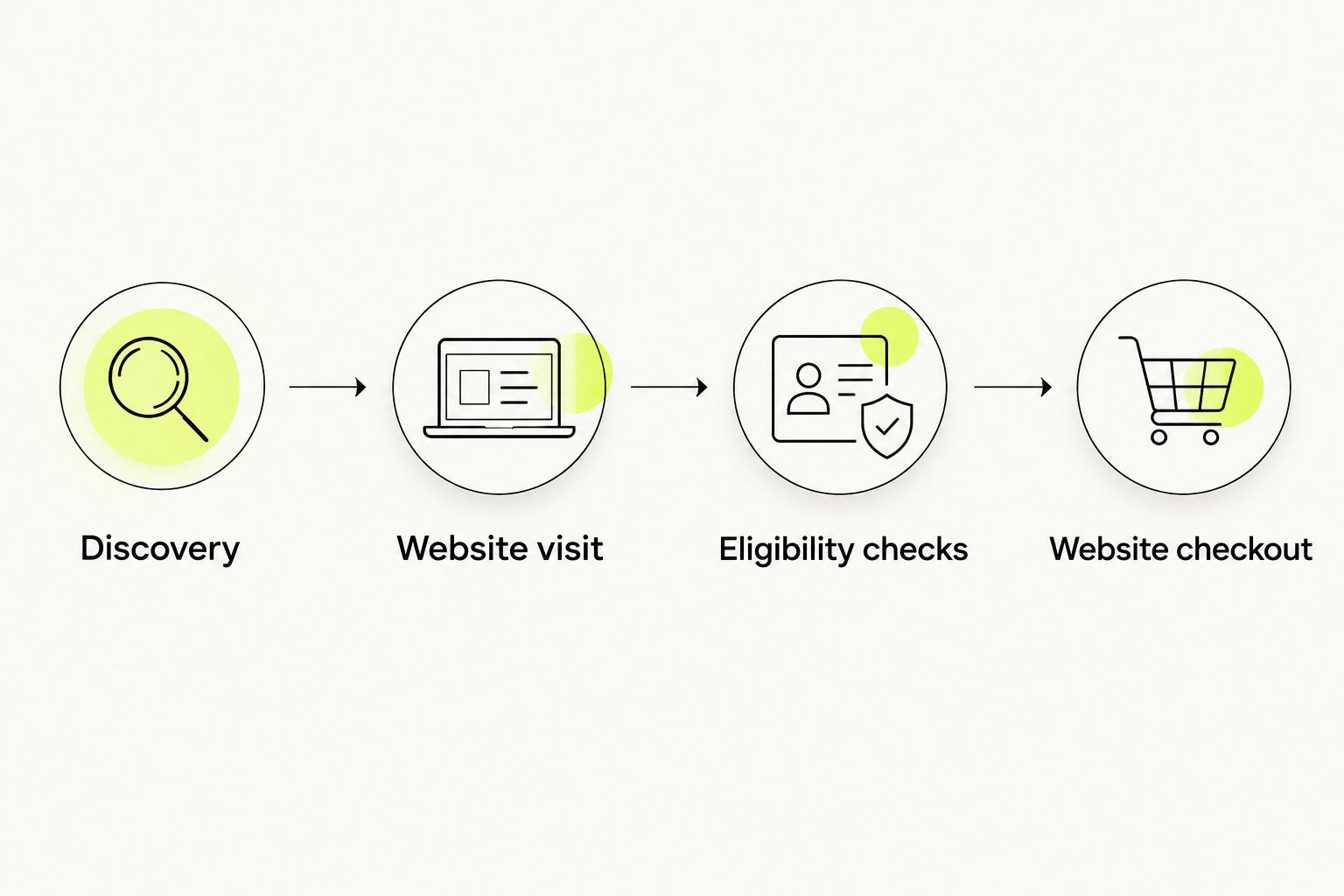
Campaign tracking has limits. Consent choices, blocked tracking, browser changes, and a later visit from another device can prevent a complete attribution trail. Report what the configured system records, not a claim that every Instagram-influenced order has been identified.
Story links whenever your content changes
A second workflow connects a specific Story to a relevant website destination. Use it after the profile route passes testing, not as a workaround for a rejected wine catalog.
- Choose a useful content angle. Explain a wine category, a serving question, or the winery’s production approach using supported facts. Keep product-specific statements tied to the current record.
- Create the Story. Use approved photography or bottle-free editorial imagery. If a real product appears, preserve the authentic product image rather than substituting a generated bottle or label.
- Add the destination. Open the Story sticker tray and select Link where available. Paste the tested, placement-labeled website destination and choose Done.
- Preview and publish. Read the Story and destination together. The link must deliver what the Story promises, with the correct market and product information.
- Test the published route. Open the live Story from a visitor account and follow the link through the mobile website checks.
Expected result: The Story leads directly to a relevant website page, and its traffic remains distinguishable from the profile placement.
For 2026 paid promotion, perform a separate advertising review. Meta’s alcohol-advertising rules require appropriate age and country targeting, and local restrictions still apply. Organic content, ad approval, Shop eligibility, and shipping permission are separate decisions.
Troubleshooting
Wine items are rejected from the catalog
Remove the wine items from the Shop workflow. Alcohol rejection is not a missing-description problem. Do not recategorize wine as food, merchandise, or a non-alcoholic product to bypass the rule; maintain a permitted website traffic route instead.
The link opens the wrong regional page
Replace the destination with the verified page for the intended audience. Test from the live profile or Story, not only from the Shopify administration. Check any market redirects before publishing more content, and never transfer regional product facts into US copy.
An eligible visitor cannot reach checkout
Reproduce the issue inside Instagram’s browser. Check market selection, verification overlays, shipping configuration, and payment navigation in sequence. Fix the failing control without removing age checks or broadening shipping permissions simply to complete the test.
An ineligible destination reaches checkout
Stop promotion of the affected route and investigate the destination restrictions. Compare market settings, shipping zones, and any compliance application rules with the approved fulfillment requirements. Retest both eligibility outcomes before resuming promotion.
Instagram traffic appears without campaign details
Inspect the live link for missing parameters and test whether redirects preserve them. Confirm that your analytics system captures the fields you intend to report. Keep unattributed activity separate rather than assigning it to Instagram by assumption.
Customize your workflow
Improve the destination before multiplying the links. Give each content theme a clear purpose: category education for newcomers, current wine details for interested readers, and eligibility information before checkout.
For Tinto Amorio natural wine content, that means keeping a playful, sensory Instagram post connected to accurate website information. Explain skin contact without borrowing an unsupported certification or maceration figure from another record.
If eligibility controls need attention, use the deeper guide to connecting age verification to a Shopify wine store. Evaluate the verification method against the winery’s requirements rather than choosing it only for the appearance of its popup.
Expand only after the baseline works. Add consent-based follow-up through the winery’s approved marketing systems, keep wholesale inquiries separate from consumer checkout, and retain a documented owner for each configuration change.
FAQ
Can I set up an Instagram Shop to sell wine in 2026?
No. Meta’s Commerce Policies prohibit alcohol listings in Shops. Build a permitted Instagram-to-website traffic route instead, with checkout and required eligibility controls on the winery’s website.
Can a winery put its website link on Instagram?
A winery can use website links subject to Instagram’s applicable rules. A profile link does not grant permission for prohibited commerce activity or remove the winery’s legal obligations for direct wine sales.
Do I need the Shopify Facebook and Instagram integration for this workflow?
No. The profile-link workflow does not require syncing wine into a Meta Shop catalog. Configure website checkout and measurement separately, and do not treat access to an integration as permission to list alcohol.
Is an age popup enough for a Shopify wine store?
No. A self-declared age popup alone does not establish legal compliance. Review purchaser verification, destination eligibility, and delivery requirements with the winery’s compliance owner.
Can I take wine orders through Instagram messages?
Do not use Instagram messages as an informal wine checkout. Direct eligible customers to the winery’s approved website process, and keep payment details and identity documents out of messages.
Can I advertise wine on Instagram if Shop listings are prohibited?
Alcohol advertising is governed separately from Shop listings. Review Meta’s Advertising Standards, age and country targeting requirements, and applicable local law before running a campaign.
Does Tinto Amorio’s wholesale footprint establish direct-shipping coverage?
No. Wholesale distribution and direct-to-consumer shipping are different channels. Confirm the permitted destination through the winery’s current direct-sales process rather than inferring it from wholesale territory.
One last thing
A successful link test includes a rejection. If your 2026 workflow sends an ineligible destination all the way through an unauthorized order, the route is not ready—even when every button works.
Test the visitor who must be stopped, not just the visitor who should buy. That turns a working Instagram link into a controlled website-sales workflow.